
Reviewed · TOKYO
Japan: eSIM with Unlimited Local 4G/5G Data
Japan’s trains, maps, translation tools, restaurant menus, and ticket apps all work better when your phone connects as soon as you land. This KDDI au eSIM gives you local 4G or 5G data without a plastic SIM card, and setup is handled with a QR code sent by email.
I like two things right away: you get unlimited local data, and you can choose between the full-speed Ultra plan and the less expensive Lite plan. The service has also worked well for practical travel needs, including subway use and hotspot sharing between phones.
The main catch is timing. The QR code arrives separately, one day before your activity date, and the plan clock starts on the first connection in Japan, counting calendar days. Lite also has a 10Mbps speed limit, while hotspot use comes with set data allowances.
In This Review
- Key points for using this Japan eSIM
- What this $10 Japan data plan actually gives you
- Choosing Ultra or Lite before you fly
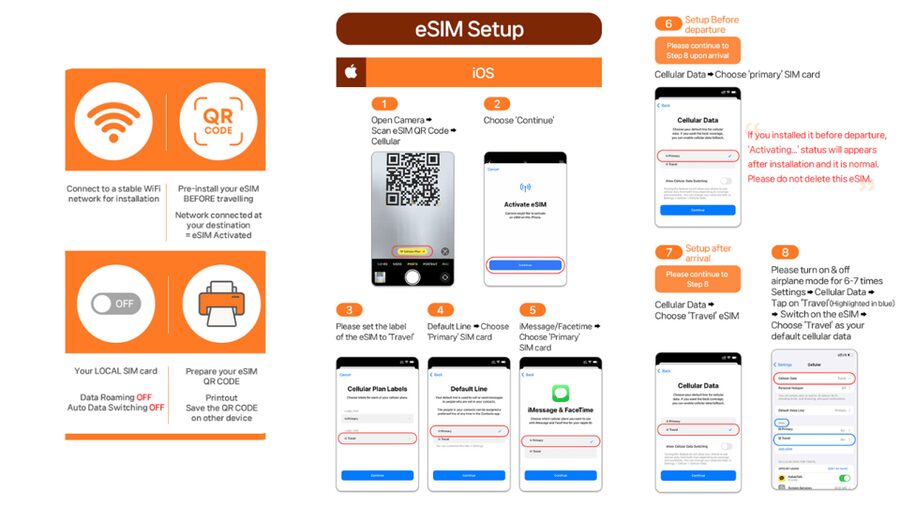
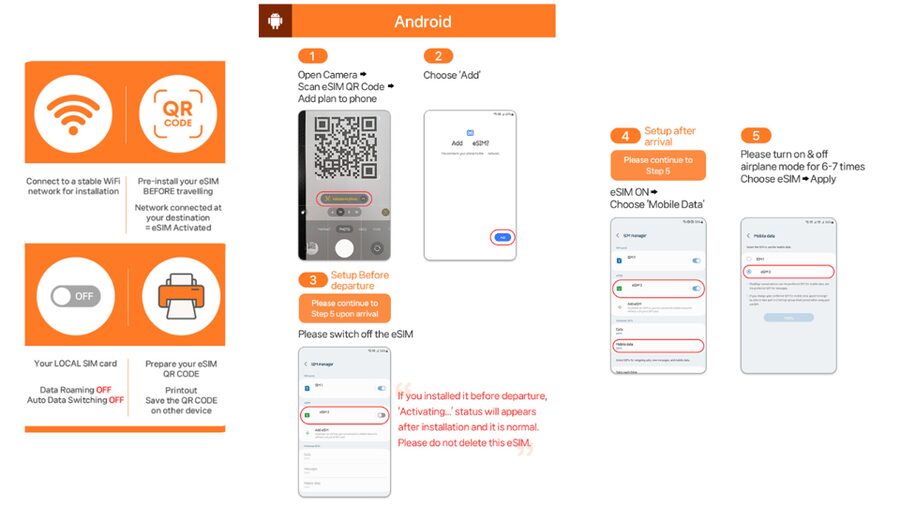
- Installing the QR code before departure
- Your first connection after landing in Japan
- Fixing the invalid QR code message
- Coverage, speed, and ordinary Japan sightseeing
- Sharing data with a second phone
- What is missing from the service
- Who will get the most value from it
- Booking timing and refund caution
- Should you book this Japan eSIM?
- FAQ
- Is the QR code on the booking voucher the eSIM QR code?
- How do I check if my phone supports eSIM?
- Does my phone need to be unlocked?
- When does the eSIM connect to the Japanese network?
- How is the plan duration calculated?
- Are voice calls and SMS included?
- What is the difference between Ultra and Lite?
- Can I share the eSIM connection by hotspot?
Key points for using this Japan eSIM
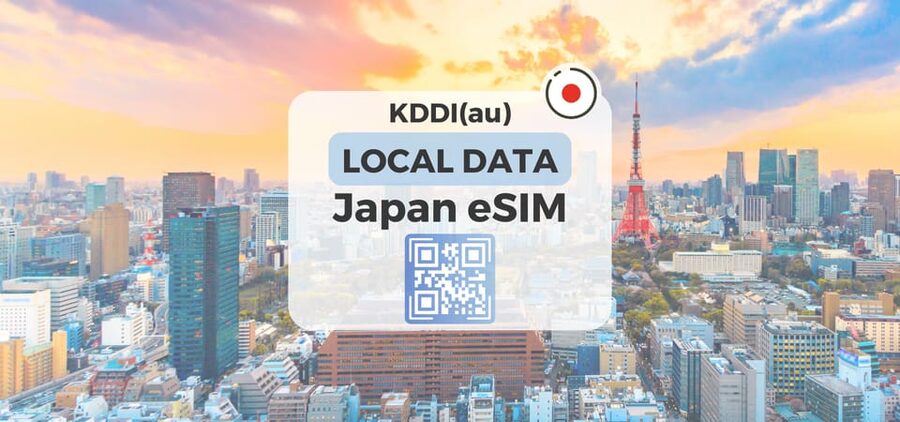
- KDDI au network access: Connect to local 4G or 5G service after you arrive in Japan.
- Two useful plan types: Ultra has unthrottled data, while Lite reaches speeds up to 10Mbps.
- No physical SIM card: Scan the separate eSIM QR code and install the plan on a compatible, unlocked phone.
- Calendar-day billing: A late-night activation can count as a full day by midnight, so timing matters.
- Hotspot limits apply: Tethering is supported, but the allowance depends on your plan and duration.
- Data only: Voice calls and SMS messaging are not included.
What this $10 Japan data plan actually gives you
At $10 per person, this eSIM can be a good deal for a short visit, especially if you want to avoid airport counters and Japanese SIM-card paperwork. You buy the plan before departure, receive an eSIM QR code by email, and connect after your phone reaches Japan.
The key word is data. You can browse, use maps, send messages through internet apps, check train information, translate signs, and make internet-based calls. You do not receive a Japanese phone number, regular voice service, or SMS messaging.
That distinction matters. If a bank, airline, or booking service sends a verification code by SMS to your normal number, you may still need access to your home SIM. Keep your regular number available if your phone supports dual SIM use, but be careful about roaming charges from your home carrier.
The advertised $10 price is easiest to judge against your travel style. A solo visitor who needs maps and messages may find it cheaper and simpler than paying daily roaming fees. A couple or family can also use one phone as a hotspot, but the hotspot allowances are limited, so each person having an eSIM may be better for heavy use.
If you're still narrowing it down, here are other tours in Tokyo we've reviewed.


Choosing Ultra or Lite before you fly
The Ultra plan is the straightforward choice if you want the fastest available local data. It includes unlimited 5G and 4G data with no throttling, and plan lengths range from 3 to 30 days.
That makes Ultra a better match for long stays, frequent video use, large downloads, or anyone who simply does not want to think about a speed cap. Actual 5G service still depends on your location. Indoors, underground, or in crowded places, your phone may switch to 4G.
Lite also offers unlimited 5G and 4G data, but maximum speed is 10Mbps. For ordinary sightseeing, that is generally a sensible ceiling. Maps, email, web pages, translation, messaging, and standard social media should be manageable, though the supplied information does not promise performance for every type of streaming or download.
Lite plans run from 3 to 10 days. The shorter range can suit a brief Tokyo stop or a compact Japan visit, but it is less useful for a longer trip. One practical complaint is the limited choice of durations, so check your exact dates before buying.
Here is the important hotspot detail for Lite:
- 3-day plan: 3GB hotspot data
- 4-day plan: 3GB hotspot data
- 5-day plan: 4GB hotspot data
- 6-day plan: 5GB hotspot data
- 7-day plan: 6GB hotspot data
- 8-day plan: 7GB hotspot data
- 9-day plan: 8GB hotspot data
- 10-day plan: 9GB hotspot data
The information also lists hotspot allowances for longer plans: 15GB for 15 days, 19GB for 20 days, and 30GB for 30 days. These figures matter if you plan to connect a laptop, tablet, or another phone. Unlimited data on the eSIM does not mean unlimited tethering.
Installing the QR code before departure
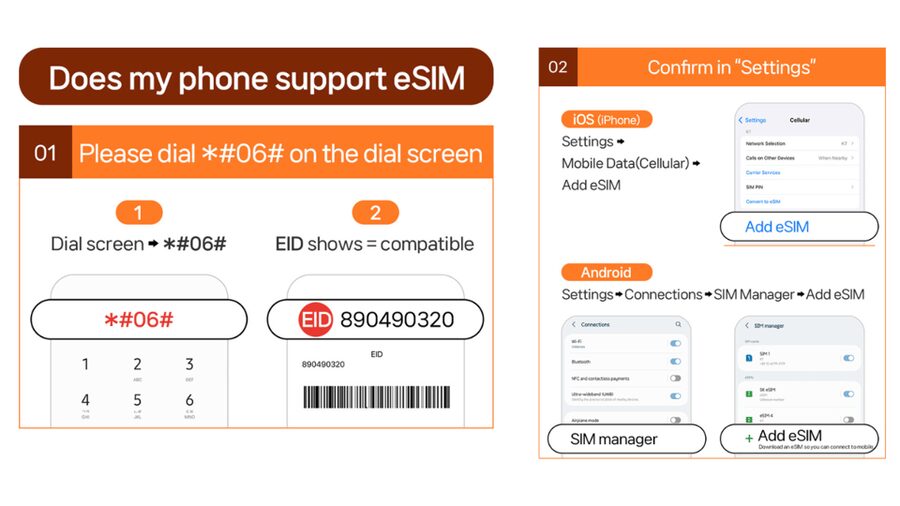
The first step is checking your phone. It must support eSIM technology and be unlocked for a foreign SIM or eSIM. On many phones, you can dial #06# and look for an EID. If no EID appears, the phone is not compatible with eSIM.
Do this check before purchasing. The QR code is delivered separately by email one day before the activity date, not as the QR code shown on the GetYourGuide voucher. That difference is easy to miss and could cause confusion at the airport.
Once the separate code arrives, follow the setup guide and install the eSIM while you have a reliable Wi-Fi connection. Keep the email handy until you confirm that the plan appears in your phone’s cellular settings.
The QR code must be installed and activated within 30 days of purchase. You also cannot receive a refund after the eSIM QR code has been sent, so confirm your phone model, unlock status, travel dates, and selected plan first.
Do not assume that installation means the plan has started. The eSIM connects to the KDDI au network after you arrive in Japan. The usage period begins with the first connection to that network, not simply when you scan the code at home.
Your first connection after landing in Japan
Once you arrive, the phone should connect to the local KDDI au network. You may need to select the new eSIM for mobile data and check that data roaming is enabled for that line, depending on your phone’s setup instructions.
The plan uses calendar days. If you first connect at 10 PM Japan time, that counts as one full day by midnight. This is the most important timing issue in the whole purchase.
For a short plan, avoid activating at the end of a late evening unless you need data immediately. If you land at night and have airport Wi-Fi, you may prefer to wait until the next morning, provided your phone and plan settings allow you to control when the eSIM connects.
In actual use, the service has been suitable for staying connected around Japan, including subway travel. That is useful because underground sections can make a local connection especially handy for checking directions, meeting points, and train information before or after a ride.
Still, no mobile plan promises perfect service in every corner. The information specifically notes that 5G can fall back to 4G indoors, underground, or in crowded areas. A switch to 4G is normal and does not necessarily mean the eSIM has failed.
Fixing the invalid QR code message
A common installation worry is seeing a message such as QR code is invalid. The supplied instructions say to check your phone’s cellular or SIM settings before assuming the installation failed.
On an iPhone, go to Settings, then Cellular. On an Android phone, go to Settings, Connections, then SIM Manager. Look for a newly added eSIM. If it appears there, the phone may have installed it even though the scan screen displayed an error.
This is a good reason not to delete anything in a hurry. Check the available SIM lines first, then contact the supplier by email or WhatsApp if you still cannot use the service.
Save the setup guide before you leave home. The guide and FAQ are available at https://psce.pw/79uszq. Having the instructions offline or in your email can save time when you are tired, carrying luggage, and trying to get your first train.






Coverage, speed, and ordinary Japan sightseeing
KDDI au coverage is listed for Japan, with access to local 4G and 5G data. The practical benefit is not only speed. It is the freedom to use your phone without hunting for public Wi-Fi every time you leave a hotel.
You can keep maps open while walking, look up a restaurant, translate a menu, check a reservation, and send a message without waiting to reconnect. One person who used the service found the signal available even on the subway, which is a useful sign for city sightseeing.
Ultra is the better fit for people who use a lot of data or dislike limits. Lite is more about reasonable everyday performance at a capped speed. Since both plans are described as unlimited for local data, the Lite restriction is speed rather than a normal daily data cutoff.
The 10Mbps ceiling is worth viewing calmly. It is not the same as having only a small number of gigabytes for phone use. Your bigger concern is intensive activity, such as frequent high-quality video, large file transfers, or using your phone as the main connection for several devices.
Crowded stations, underground platforms, and enclosed buildings can affect the 5G signal. Your phone may show 4G instead. For maps and messages, that change should not be a major issue, but you should not buy Ultra solely on the assumption that 5G will appear everywhere.
Sharing data with a second phone
Hotspot sharing is supported, which can lower the cost for a pair traveling together. You can connect another phone to your device and use the same local data connection for basic needs.
The limits are important. Hotspot data is not unlimited in the same way as the main eSIM allowance. The listed caps range from 3GB on some short plans to 30GB on the 30-day option.
A pair using hotspot only for maps, messaging, and occasional searches may do fine. Two people streaming video, backing up photos, or connecting laptops could use the allowance quickly. If you need dependable data for several devices, compare the cost of separate eSIMs rather than assuming one plan will cover everyone.
Hotspot use also means the host phone needs battery power. That is a small but real issue during long sightseeing days. Carrying a power bank is sensible, though a power bank is not included with this experience.
What is missing from the service
This is a data connection, not a full Japanese mobile phone plan. Voice calls and SMS messaging are not included.
You can still communicate through internet-based messaging and calling apps when you have data. But standard calls and text messages tied to a phone number will not come from this eSIM.
The plan also does not include a physical SIM card, delivery of a device, or any stated airport pickup. The entire setup depends on your own compatible phone and the emailed QR code.
That simplicity is part of the appeal, but it puts more responsibility on you. Check compatibility before buying, make sure the phone is unlocked, watch for the separate email, and know how to switch cellular data lines in your settings.
Who will get the most value from it
I would consider this eSIM for a visitor who wants a quick connection and does not need a Japanese phone number. It suits short independent trips, city breaks, and longer visits where constant map and translation access are useful.
Ultra fits you best if you want full-speed data for up to 30 days or plan to use your phone heavily. Lite can be a sensible option for a 3 to 10-day visit when ordinary browsing and navigation matter more than top speed.
It is less suitable if your phone lacks eSIM support, is locked to your home carrier, or depends heavily on SMS verification. It is also not ideal as a shared family connection unless you understand the hotspot cap.
The service has a 4.5 rating from 163 reviews, and the strongest practical points are easy installation, broad signal availability, and the ability to share data. Those are exactly the features that matter once you are moving around Japan rather than sitting in a hotel.
Booking timing and refund caution
You can reserve and pay later, which helps if your Japan plans are still taking shape. Cancellation is allowed up to 24 hours before the activity date for a full refund.
That protection ends once the eSIM QR code has been sent. Since the code arrives one day before the activity date, treat the period after delivery as final.
Do not wait until the airport to solve compatibility questions. Check the EID, confirm the phone is unlocked, and read the setup instructions before the QR code arrives. The actual activation happens after you reach Japan, but the installation work is best done before departure on Wi-Fi.
Should you book this Japan eSIM?
Book it if you want simple local data, your phone supports eSIM, and you are comfortable managing a data-only connection. The $10 price is attractive for a short visit, while Ultra gives longer-trip flexibility and full-speed data.
Choose Lite if your needs are modest and your trip lasts no more than 10 days. Choose Ultra if speed matters, you use a lot of data, or you want a plan lasting up to 30 days.
Skip it if you need voice calls or SMS, have a phone without an EID, or expect unlimited hotspot use. For everyone else, this is a practical way to keep maps, messages, and travel tools working from the moment your phone connects to Japan’s KDDI au network.
FAQ
Is the QR code on the booking voucher the eSIM QR code?
No. The eSIM QR code is sent separately by email one day before the activity date.
How do I check if my phone supports eSIM?
Dial #06# on your phone and check for an EID. If no EID appears, the phone is not compatible with eSIM.
Does my phone need to be unlocked?
Yes. Your phone must be unlocked for a foreign SIM or eSIM.
When does the eSIM connect to the Japanese network?
The eSIM connects to the local KDDI au network after you arrive in Japan.
How is the plan duration calculated?
The duration uses calendar days, starting with the first connection to the KDDI au network in Japan. An activation at 10 PM counts as a full day by midnight.
Are voice calls and SMS included?
No. The eSIM provides data only. Voice calls and SMS messaging are not included.
What is the difference between Ultra and Lite?
Ultra includes unlimited 5G and 4G local data with no throttling. Lite includes unlimited local data with a maximum speed of 10Mbps.
Can I share the eSIM connection by hotspot?
Yes, hotspot sharing is supported with limitations. The available hotspot allowance depends on the plan duration, ranging from listed caps of 3GB to 30GB.
More tours in Tokyo we've reviewed










Tokyo, compared.
 ★ 5.0Mt Fuji and Hakone 1-Day Bus Tour Return by Bullet TrainFrom $163
 ★ 5.01-Day Tokyo Bus TourFrom $129
 ★ 4.6Tokyo: teamLab Planets TOKYO Digital Art Museum Entry TicketFrom $251 day
 ★ 4.0Mt Fuji & Hakone Cruise, Drum Show Bullet Train 1 Day from TokyoFrom $149
 ★ 5.0Tokyo: Shinjuku Food Tour (13 Dishes at 4 Local Eateries)From $86
 ★ 4.4Tokyo Mt Fuji 5th St & Hakone Cruise Bus Tour w/Bullet TrainFrom $15410 hours